How StackVet works
The path from "I built an app" to "I have a report": what you do, what your AI coding tool does, and what StackVet does.
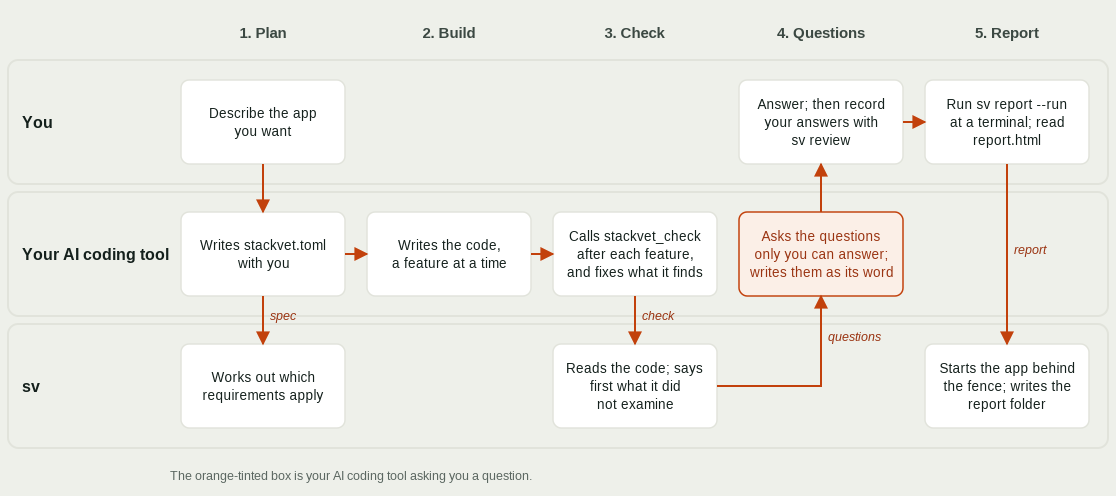
When only you can answer, your AI tool stops and asks.
Step 4 in a real build: StackVet's check found that the app gave nobody a way to report a security problem, and the AI tool would not make up an address to put there.
From a real build in VS Code with GitHub Copilot, 14 October 2026, in the tool's own words
In detail
This is the account written for the research paper about StackVet, of StackVet as it was on 4 October 2026, when it was still called SecureVibe and its settings file securevibe.toml. The way it works is the same; some details, such as the number of commands, have grown since. Three of them change what the account below says:
- The settings file is now
stackvet.toml. - The outside tools run with every report unless you add
--no-tools; on 4 October they ran only when asked for. - The live-site check is no longer StackVet's only network connection. There are four exceptions now, and what StackVet does with your code lists them all. The live-site check itself makes at most five requests when you ask it to look at an API too.
The current map of the code is docs/ARCHITECTURE.md.
sv does not write the app. The owner builds it in their own AI coding tool, in any language, and sv grades what was built against OWASP ASVS 5.0, AISVS 1.0, and the Secure by Design checklist. Four things go in:
- the app's folder;
securevibe.toml, a manifest the AI coding tool fills in from the specsv initprints (the stack, how to start the app, its test users, and its answers to design questions);security-notes.md, the owner's written answers to the questions no tool can settle. The AI coding tool can write an answer there too, throughsv, and it is always marked as the tool's own;- advisory data the owner downloaded.
Two things go the other way, to the AI coding tool before it writes code: rules to follow while it codes, from AISVS Appendix C (sv rules, written into the app's AGENTS.md), and prompts to give it, each marked as shown to work or not (sv prompts).
sv first works out which requirements apply (sv scope). It then gathers evidence in five independent stages:
- It reads the code (
sv check). One walk of the folder covers credentials, configuration and start commands, a bill of materials (and whether each manifest agrees with its lockfile), 19 tree-sitter rules in 15 languages, and the app's own tests that name a requirement. - It runs outside tools (
--tools). These are Semgrep, Bandit, CodeQL, gosec, and Brakeman, each rule mapped to the requirements it can speak to. Semgrep runs with its usage reporting off; when it is not installed, Opengrep, an open-source fork of its engine, runs in its place, and the report says so. - It compares every package against known vulnerabilities (
sv audit), offline. - It starts the app behind a network fence and asks it questions (
sv run). The fence is a Docker network made with--internalfor each run and confirmed internal before anything starts. The app runs with a read-only file system and no capabilities, writing only to two small in-memory folders. Inside the fence, a test model stands in for the AI service, serves a test MCP tool, and records what a feature that fetches addresses tries to fetch. A test sign-in provider, a mail catcher, and a headless browser run there too. The questions come as a stranger, as signed-in users, as one action sent 20 times at the same instant, of the AI feature, and of the app's own MCP server. A rate limiter's answer is waited out, and a crash is never read as the app refusing. - It asks the live site (
sv probe). This is the one network connectionsvmakes of its own: at most four read-only requests to an address the owner types, for the certificate and its stapled revocation status, HTTPS, cookies, and whether the site still accepts old versions of TLS.
Each requirement then takes the strongest evidence behind it:
- a finding (needs attention) outranks everything;
- below it, in order: checked, documented by the owner, checked by hand by the owner, attested by the owner, stated by the AI coding tool, and not verified.
A stage that cannot run marks what depended on it not assessed, never a pass and never a failure. The report (sv report, in HTML, Markdown, SARIF, and JSON) opens with what was not examined, and names the version and commit of the sv that made it. It also carries a threat model, the tests worth writing, and what only the owner can check, and it never says a requirement passed. sv bundle seals the app and its report with a SHA-256 for every file. sv mcp serves the same checks to the AI coding tool through ten tools, offers the written reports to it as resources, says which of seven stages a long check has reached, and stops waiting after 50 seconds (--time-limit changes it), saying nothing was assessed. That closes the loop: the tool reads the findings, changes the app, and runs the checks again.
sv has fourteen commands: init, scope, notes, questions, rules, prompts, probe, run, check, sbom, audit, report, bundle, and mcp.