Vibe-code your app with security in mind from the first prompt.
Connect StackVet to your AI coding tool before you start. As you describe your app, it tells your tool which OWASP security rules apply, checks the code after each feature, and has your tool ask you the questions only you can answer. Once your app works, StackVet writes a report: the most important things to fix first, then what was checked, and what nobody has looked at yet.
From a real build in Cursor, 14 October 2026, in the tool's and the person's own words, shortened, with one line moved to the end and a few words of ours in square brackets
sv review.You don't need to be a programmer.
StackVet is for people building an app by talking to an AI coding tool: Claude, Cursor, or the AI in VS Code. You describe what you want and the tool writes the code. StackVet checks that code after each feature, and when a question can only be answered by you, such as who should be allowed to see what, your AI tool asks you.
You don't need to know about security either. The report explains each result in plain words.
Three steps, set up once.
- Connect StackVet to your AI tool. On a Mac or Linux it runs in Docker, a free program that keeps it in a box of its own (Docker Desktop or Colima, either works); on Windows it is installed with Scoop. Setup takes about fifteen minutes, once.
- Describe the app you want. Paste the starting prompt from the guide into your AI tool, with a few sentences at the top about your app: who uses it, what they do, and what it keeps about them. The tool writes the code. After each feature it checks its work with StackVet, and it asks you the questions only you can answer.
- Read the report. One page in your browser. It starts with the most important things to fix, then what was checked, and what nobody has looked at yet. Your AI tool can read it through with you.
A report that puts what matters first and hides nothing.
Most tools give you a green checkmark or a score. StackVet starts with the most important things to fix, states every requirement in plain language, and highlights what it wasn't able to check or verify, so you know what to follow up on.
Your AI tool can help with that part, too. It can read the report through with you, explain why it matters, fix what needs attention, and help you answer the questions only you can.
Lines from a real report on Notes with users, one of StackVet's own example apps, shortened:
- needs attentionA password is stored, or a key made from it, with too few rounds of work.
- checkedDatabase queries keep the data apart from the query itself, so nobody can inject their own query.
- checked in partThe app sends people on to another site only when that site is on a list the app trusts: one check tried part of this.
- not verifiedPasswords chosen at sign-up are checked against a set of breached passwords. Only you can check this one.
- not assessed241 more requirements: nobody has answered the question that decides whether they apply.
None of these words means "passed." Even checked means one check looked and found nothing wrong, not that the whole requirement is met.
Against the standards security teams use.
OWASP is a nonprofit that writes the security checklists many companies build to. StackVet uses three of them:
| Standard | What it covers | Requirements | StackVet can confirm or fail |
|---|---|---|---|
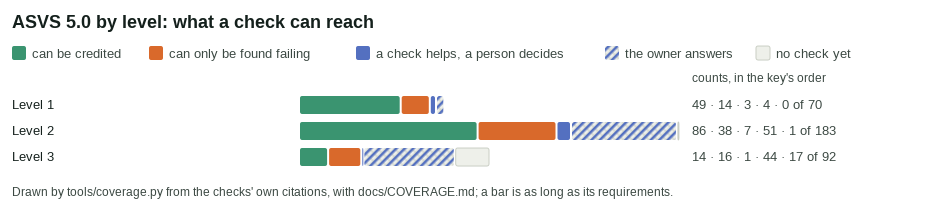
| ASVS 5.0, levels 1 and 2 | Web apps and the services behind them | 253 | 135 |
| ASVS 5.0, level 3 | The same, for apps that need the highest level of security | 92 | 14 |
| AISVS 1.0, levels 1 and 2 | Apps that use AI | 146 | 26 |
| AISVS 1.0, level 3 | The same, at the highest level | 45 | 1 |
| Secure by Design 0.5 | Decisions made before the code | 36 | built into planning |
StackVet has a check for 68 more of the ASVS requirements and 19 more of the AISVS ones, but those checks can only show the protection missing: when they find nothing wrong, that doesn't show the protection is there.
The AISVS rows leave out its Appendix C, 68 requirements for code an AI coding tool helped write; the AISVS page lists them with the rest.
Six of the ASVS ones counted above only CodeQL can check, and it runs only when you turn it on, because its license allows it only for an open-source app, academic research, or a paid GitHub license. Without it, those six stay not verified.
ASVS and AISVS sort their requirements into three levels. Level 1 is the baseline for any app, and level 2 is for most apps that hold people's information; StackVet holds each app to one of those two, from what you tell it the app does and keeps. Level 3, for apps that need to show the highest level of security, such as a bank's online banking, is there when you ask for it: StackVet holds your app to level 3 if you set it.
The Secure by Design requirements are decisions, not code, so no check can settle them. Instead, StackVet builds them into the design process: before your AI tool writes a feature, it gets the decisions to make and the prompts that help you both make them, and you answer each one yourself.
Everything StackVet can't check is still in your report, marked as not verified, so you can see it and decide what to do.
It reads code in multiple programming languages: Python, JavaScript, TypeScript, Go, Ruby, PHP, Java, C#, Kotlin, Rust, C, C++, Dart, Swift, and shell scripts. If your app uses a language it can't read, the report says so, rather than guessing.
Your code stays on your computer.
StackVet runs on your own machine. It doesn't upload your code, and it doesn't send the names of the packages your app uses anywhere. When it starts your app to test it, the app runs with no internet connection. Your AI coding tool is different: it can read every file in your app's folder, including any data or keys kept there, and it sends what it reads to the company that runs it.
There are four exceptions. Three you turn on yourself: a check of your live website, which makes at most a few requests to the address you type; if you ask for it, downloading your app's packages so it can start; and checking somebody else's public project on GitHub or GitLab, which downloads its code once, as files, and runs none of it unless you ask. The fourth is on unless you turn it off: StackVet runs the security tools each language already has, when they are installed on your computer, and one of them, Semgrep (or Opengrep in its place), downloads its rules from semgrep.dev each time it checks your app. Semgrep checks your code on your computer, with its usage reporting turned off. To check without any of these tools, add --no-tools.
Thinking of using somebody else's code? Check the project first.
Two ways to get started.
New to building with AI?
Start with the setup prompts. You copy each one into your AI coding tool, and the tool does the setup with you: it checks what your computer already has, tells you what to install and where to get it, and asks before it installs or changes anything. If a step doesn't work, it stops and tells you what happened in plain words.
You'll need an AI coding tool that can run commands on your computer, not only a chat window. The setup prompts have been tried in Cursor and VS Code with GitHub Copilot.
Want to see it first? Follow one real build, screen by screen, from the first decisions to the report.
Used a terminal or Docker before?
Install Docker Desktop or Colima, fetch StackVet with one command, and connect it to your AI tool; on Windows, install StackVet with Scoop instead. The step-by-step guide covers every command.
For the checks that start your app, install StackVet on your computer as well:
- Windows: install with Scoop, a free installer. Nothing to build.
- Mac or Linux: install with Homebrew. It builds StackVet on your computer the first time, which takes a while.
Free, open source, and honest about being new.
StackVet is free and its code is public on GitHub under the MIT license. That means anyone can use it, change it, and share it, even in their own work, as long as they keep the license with it, and it comes with no guarantee. It's new: very few people have used it yet, and what is known not to work is listed openly. If something confuses you, tell us in a GitHub issue.
Deploy apps for a living? ConfigVet, StackVet's companion for ops and DevSecOps engineers, reviews the files that say how an app is deployed. It's a preview.
Building with an AI coding tool? AgentVet, StackVet's companion, says what the record shows the tool did, and what it could not see. It's a preview too.